


What is a skills matrix and how do you create one?
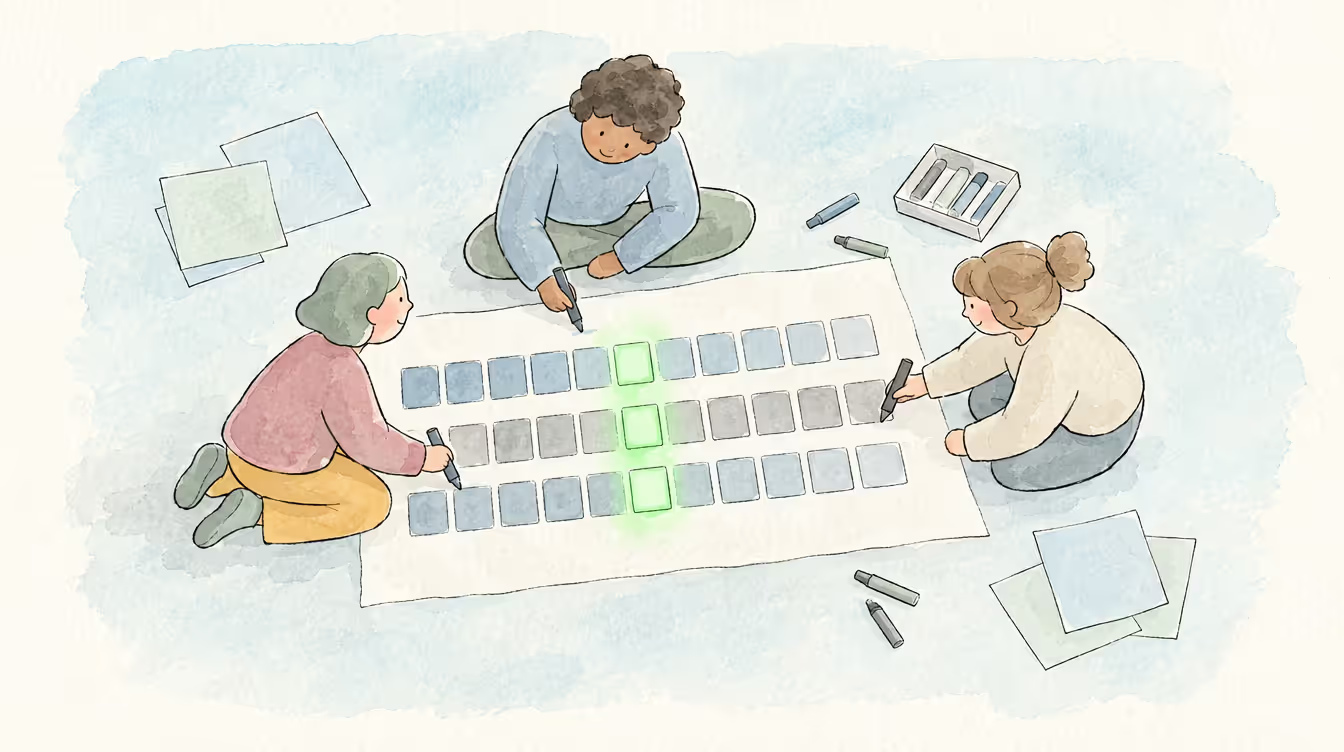
A skills matrix is a visual tool that maps the required and current skills and competencies – and their levels – for a team, department or organisation.
Most organisations have one. The problem is that very few can trust it. According to Gartner's 2024 research into talent management, only 8% of organisations have reliable data on the skills their workforce currently possesses – and 50% of HR leaders acknowledge their organisation does not effectively use the skills it already has. The skills matrix is the right concept. The implementation is where most fall short.
This page covers what a skills matrix is, what it is used for, the different types, and a practical five-step process for building one.
Looking for a deeper dive? See our complete guide to modern skills matrices — how they've evolved, what to include, and why static approaches fall short.
What is a skills matrix?
A skills matrix is a visual tool that maps the required and current skills and competencies – and their levels – for a team, department or organisation.
A skills matrix is also called a competency matrix. Skills and competencies aren’t exactly the same thing, but let’s say that skills are a subset of competencies and a skills matrix is incomplete without the inclusion of competencies.
You may also see it referred to as a 'skill matrix' – the singular form is used interchangeably with the plural and refers to the same tool. In practice, a skill matrix meaning is identical to a skills matrix: a structured map of skills, competencies, and proficiency levels across a workforce.
What is a skills matrix used for?
A skills matrix gives you a comprehensive overview of all the skills and competencies available in teams or the entire workforce. This helps decision makers to manage and deploy skills efficiently, spot skills gaps that could hurt productivity and business outcomes so that they can plug them. The insights from the skills matrix visualisation are used for daily decision making to optimise teams as well as for long-term planning. This is the ideal scenario. The quality of insights an organisation gets from a skills matrix, however, varies depending on how easy the tool is to access for all users, its user interface/user experience, whether it offers data visualisation and analysis, and more.
Who uses a skills matrix?
Traditionally, the skills matrix was largely used by the human resources department to get an overview of all the skills and competencies available in the organisation. But over the past few years, as work has become more complex, with a combination of employees, consultants and contractors working together on projects, decision makers have increasingly started using it to assess whether they have the skills and competencies needed to successfully complete the job at hand and to find, manage and deploy skills better. Skills matrices that are accessible to employees too, allow them to keep track of their skills development over time.
In practice, the tool takes different forms depending on context. A team skills matrix maps capabilities across a specific project team or department, giving managers a clear view of what the team can collectively do. An employee skills matrix focuses on individual capability – proficiency levels, certifications, development history, and career interests. Both serve the same underlying purpose: making skills visible so that decisions are made on evidence rather than assumption.
Employee, team and department skills matrices: What's the difference?
Most of the confusion around skills matrices is about scope rather than substance. The terms people search for – employee skills matrix, team skills matrix, department skills matrix – describe the same instrument pointed at different sized groups. What changes is not the structure but what you can do with the answer.
An employee skills matrix maps one person's skills against the requirements of their role. It is the view a manager uses in a development conversation: here is what this role asks for, here is where you are against it, here is the distance. Staff skills matrix is the same thing under a different name, more common in UK and public sector usage, and it means nothing different.
A team skills matrix maps a working group against the skills that group needs to deliver. This is the version most organisations build first, because it answers the question that hurts most immediately – can this team do the work in front of it, and what happens when one person is unavailable. It is also where single points of failure become visible for the first time. One name in a column with no one beside it is a delivery risk that nobody had written down.
A department skills matrix widens the frame to a function – engineering, quality, delivery – and starts to answer planning questions rather than staffing ones. Where is capability concentrated? Which skills exist in one team and nowhere else? At organisation-wide scale the same structure becomes a workforce planning instrument: what capability do we hold, and does it match what the strategy assumes we hold?
The distinction that matters is not which of these you build. It is whether they are the same underlying data seen at different zoom levels, or four separate documents maintained by four different people. Separate documents drift apart within a quarter, and the organisation ends up with four answers to the same question.
Sophistication is a separate axis, and every one of these versions exists at every level of it. At the simplest, a skills matrix is a pen-and-paper grid of employees against their skills, competencies and proficiency. A step up, it is a colour-coded spreadsheet with names down one side, skills across the top, and levels in the cells. Both work – briefly. Their real limitation is that they sit outside your HR and organisation-wide systems, and that isolation compounds: it limits how usable the matrix is, poor usability degrades the quality of the skills data people bother to enter, and poor data undermines every insight anyone tries to draw from it.
More advanced skills matrices capture what a static grid cannot – whether an employee is willing or interested in using a particular skill, certifications and their validity dates (which in regulated industries is a legal requirement rather than good practice), development goals, skills growth over time, and availability for project-based work.
Modern software-based skills matrices hold all of that and add the piece that makes the matrix operational. Managers can enter a master list of the skills each role requires and run a skills gap analysis against it – skills required versus skills that exist – to see whether a team, department or organisation actually holds what it needs to succeed. And because these matrices are dynamic and updated continuously, everyone is looking at the same current picture rather than a snapshot someone exported last quarter.
What are the benefits of a modern skills matrix?
A modern skills matrix is a valuable tool for the following reasons:
- Identifying the right people for the job
Skill matrixes allow team leaders to pick the employees who have exactly the skill sets that are needed for the job or project. Team members are better prepared for projects too because they are aware of all the skills and competencies available in their team as seen on the matrix.
- Identifying skills gaps
Helps managers and team leaders to understand whether the basic skills and competencies required for the job at hand are present in their teams and to identify any gaps that can be detrimental to performance. If a particular skill or skill set is missing in the team, they can take remedial action such as training and development, bring on board employees with that skill from elsewhere in the organisation, or even recruit someone new.
- Utilising internal resources more efficiently
It helps organisations to efficiently utilise existing skills by redistributing talent internally and planning for future recruitment, leading to workforce optimisation.
- Helps employees grow
A skills matrix that highlights employee strengths and weaknesses can be a starting point for their self-improvement. Similarly, learning and development departments can use skills data available on a skills matrix to assess who needs to undergo training and to what degree.
- Improved employee experience When employees arematched with projects that need their skills, the outcome is always good –leading to engaged employees and satisfied clients.
For a deeper look at how a modern skills matrix benefits both organisations and individual employees, see skills matrix benefits: what organisations and employees gain.
What should a modern skills matrix include?
A skills matrix that is genuinely useful for decision-making needs to capture more than a list of names and skills. The following elements are what distinguish a modern skills matrix from a static spreadsheet:
• Proficiency levels. A binary qualified/unqualified record tells you almost nothing useful. A three-levelgrading system – beginner, intermediate, expert, with sub-levels – givesleaders a reliable picture of actual capability. Two people may share a skill but at very different levels of mastery. That distinction matters for projectstaffing and development planning.
• Soft skills alongside technical skills.Communication, problem-solving, leadership, and emotional intelligence are not supplementary – they are central to how work gets done and whether teams function under pressure. A skills matrix that captures only technical ability will consistently overlook the factors that determine whether projects succeed and whether people thrive in their roles.
• Certifications and validity dates. For regulated industries and compliance-driven roles, tracking which certifications are current, expiring, or expired is not optional. This data should be part of the matrix – not managed in a separate document.
• Interest and willingness data. Knowing that someone has a skill is not the same as knowing whether they want to use it.Capturing employees' own assessment of their interest in applying particular skills leads to better role-fit decisions and higher engagement.
• A role skills baseline. A master list of the skills required for each role allows the matrix to function as a gap analysis tool – showing not just who has what, but how closely each person matches whatt heir role demands.
• Regular updates. A skills matrix updated once a year is structurally out of date before the year is over. Modern skills matrices are maintained continuously – updated as part of project completions, development conversations, and role changes, not saved for annual reportingcycles.
For a detailed look at the most common mistakes organisations make when implementing a skills matrix – and how to avoid them – see skills matrix best practices: 5 mistakes to avoid.
How skills matrix proficiency levels work
A skills matrix that records whether someone has a skill is barely worth building. Almost everyone has some exposure to almost everything, and a grid of ticks tells you nothing about who can actually be put on the work. Levels are what turn the matrix from a list into a decision tool.
The common mistake is to use too few of them. A three-point scale – beginner, intermediate, expert – sounds clean and collapses under contact with reality, because the gap between someone at the bottom of "intermediate" and someone at the top of it is the difference between needing supervision and providing it. Too many levels fail the other way: a fifteen-point scale invites people to agonise over distinctions they cannot make honestly about themselves, and completion rates fall.
MuchSkills uses a 1–9 scale, banded into three groups of three: 1–3 beginner, 4–6 intermediate, 7–9 expert. The bands give people a fast answer to the question they can answer easily – roughly where am I? – and the sub-levels let them be precise within it. In practice most people place themselves in a band in seconds and then adjust one point either way.
The banding also carries an operational meaning worth being explicit about. As Daniel Nilsson, co-founder of MuchSkills, puts it: "A beginner generally can't produce." Productive, unsupervised contribution starts at around level 4. That single line is what makes a skills matrix answerable rather than descriptive – when a project needs a skill at level 6, the matrix returns a list of names rather than a spectrum of maybes.
Two things determine whether levels hold their meaning. The first is that everyone is scoring against the same definition of what a 6 looks like for that skill, which is a taxonomy problem rather than a scale problem. The second is honesty, and honesty is mostly a design question. When skills are visible to colleagues, people self-correct – few will claim expert status in a system where the actual expert can see it. Research from the World Bank's SkillFinder programme, covering 27,000 employees, found that making skills visible to colleagues and open to peer endorsement improved both the accuracy and the completeness of self-reported data (SkillFinder, The GovLab).
Levels also age. Someone who rated themselves a 5 two years ago is not a 5 now, in either direction, and a matrix with no mechanism for revisiting them is recording history rather than capability.
How do you create a modern skills matrix?
1. Identify the skills and competencies needed for the success of a particular team, department or organisation along with proficiency levels. To get this list, you could find answers to the following questions:
- What are the key software/methodologies employees in this role/team/department must be conversant with? What is the level of expertise required?
- What are the key people skills employees in this key role/team/department need to function efficiently every day? What is the level of expertise required?
- What are the key jobs or action-specific skills employees in this key role/team/department should have? What is the level of expertise required?
2. This is more efficient than listing all the skills each team member has because not all are relevant to the job at hand or your organisation. The skills database you get after this exercise is your skills taxonomy. For detailed steps on how to create a skills taxonomy, read this guide: What is a skills taxonomy and why does your organisation need it?
3. List the relevant skills and certifications your team currently has along with their skill levels (beginner, intermediate or expert) or interest levels. This could be in the form of a self-reporting survey or a survey along with conversations with each employee's manager. This is your skills inventory.
4. Assess the team to see if there are any skill gaps (the difference between the skills you need and the skills you have). Some tools such as MuchSkills visualise this data for you (more on that later). You could also read this detailed guide: Skills Gap Analysis: A complete guide. Or explore MuchSkills' skills gap analysis tool to see how it works in practice.
5. Create a report of skills gaps or areas where you spot room for improvement. For instance, you may be helping your customers using your own proprietary software but find out through your skills matrix that most of your customer service staff possess beginner or mid-level skills in that software. A report will throw up this problem so that you can fix it. For detailed guidance on what to do with what you find, see skills matrix best practices: 5 mistakes to avoid.
It is well established that visualised data is easier to comprehend and act on. Modern skills matrix software has made it possible to beautifully visualise skills data so that it is easy to get insights from it – spot skills gaps and identify opportunities for training and development. For a closer look at how visualisation transforms skills data into actionable intelligence, see why any skills matrix is incomplete without data visualisation.
Example: A skills matrix visualisation on MuchSkills
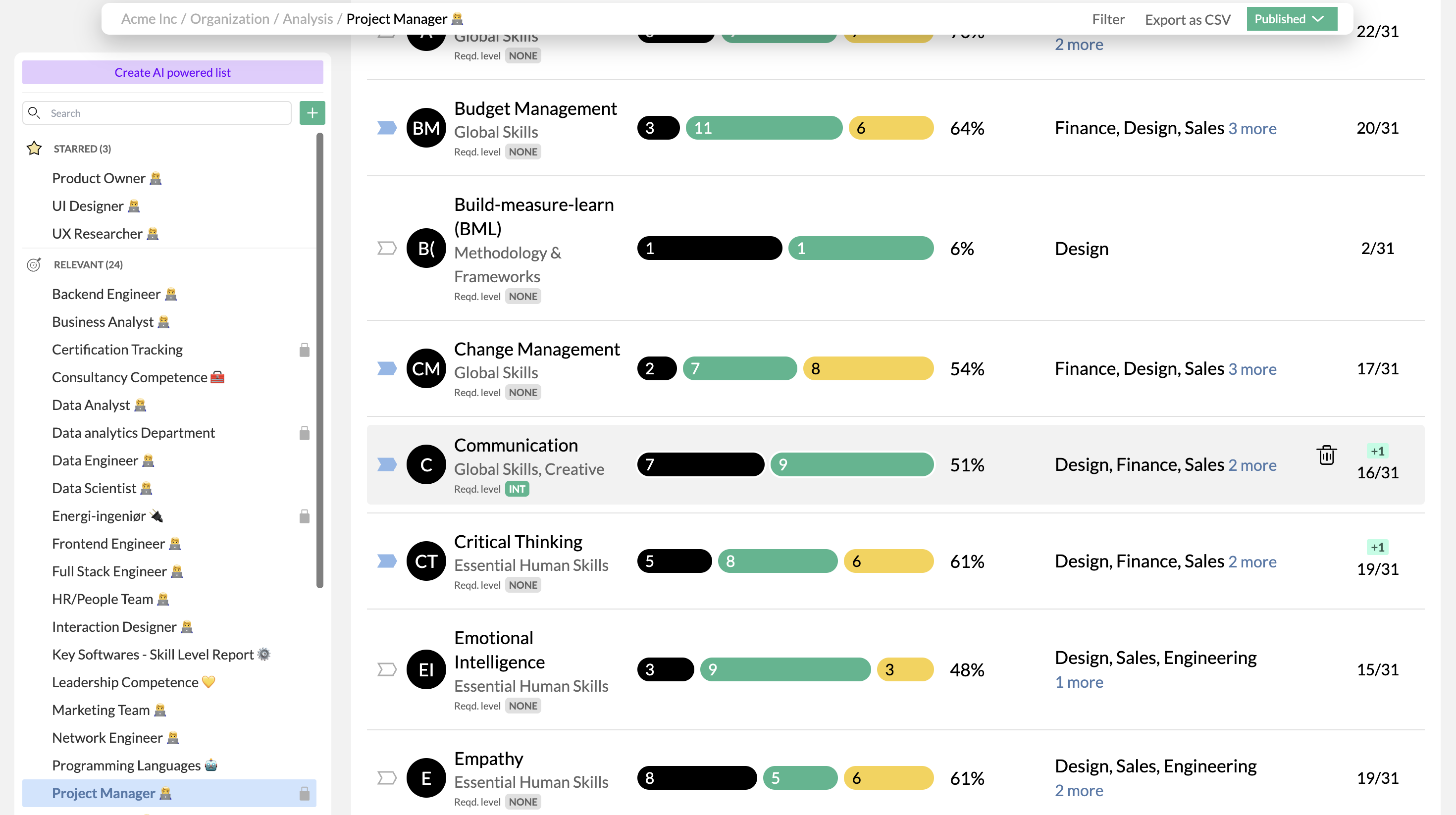
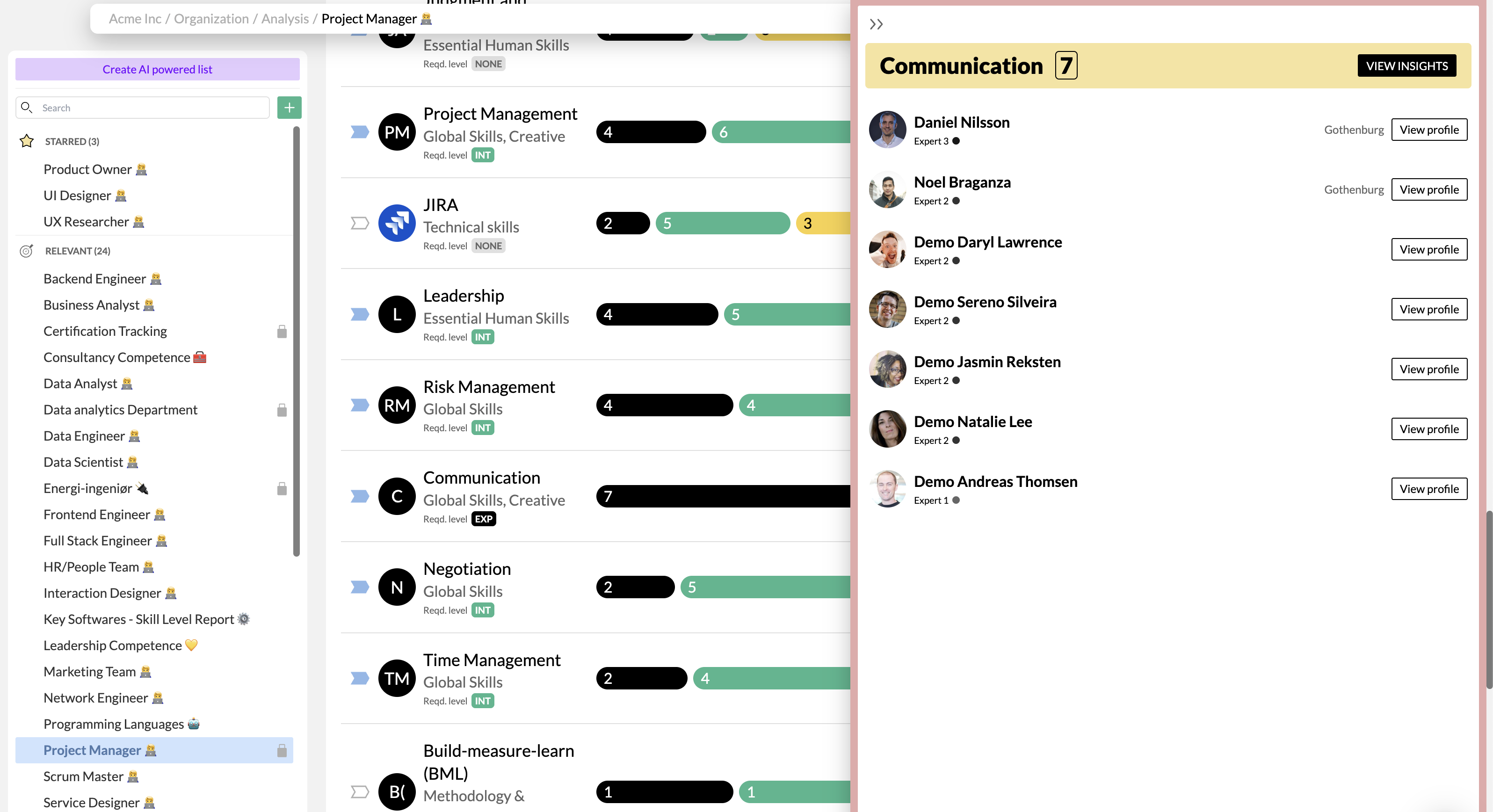
On MuchSkills, users can build a 'master' skills list for each role so employees are aware of the skills they are missing or need to develop further. In the example below, you can see 'communication' listed in the 'role description' for a Project Manager. In the visualisation, you can easily see that of 31 members across the organisation, only 51% have 'communication' marked as Intermediate and above (7 ranked 'expert' and 9 ranked 'intermediate'). Not good!
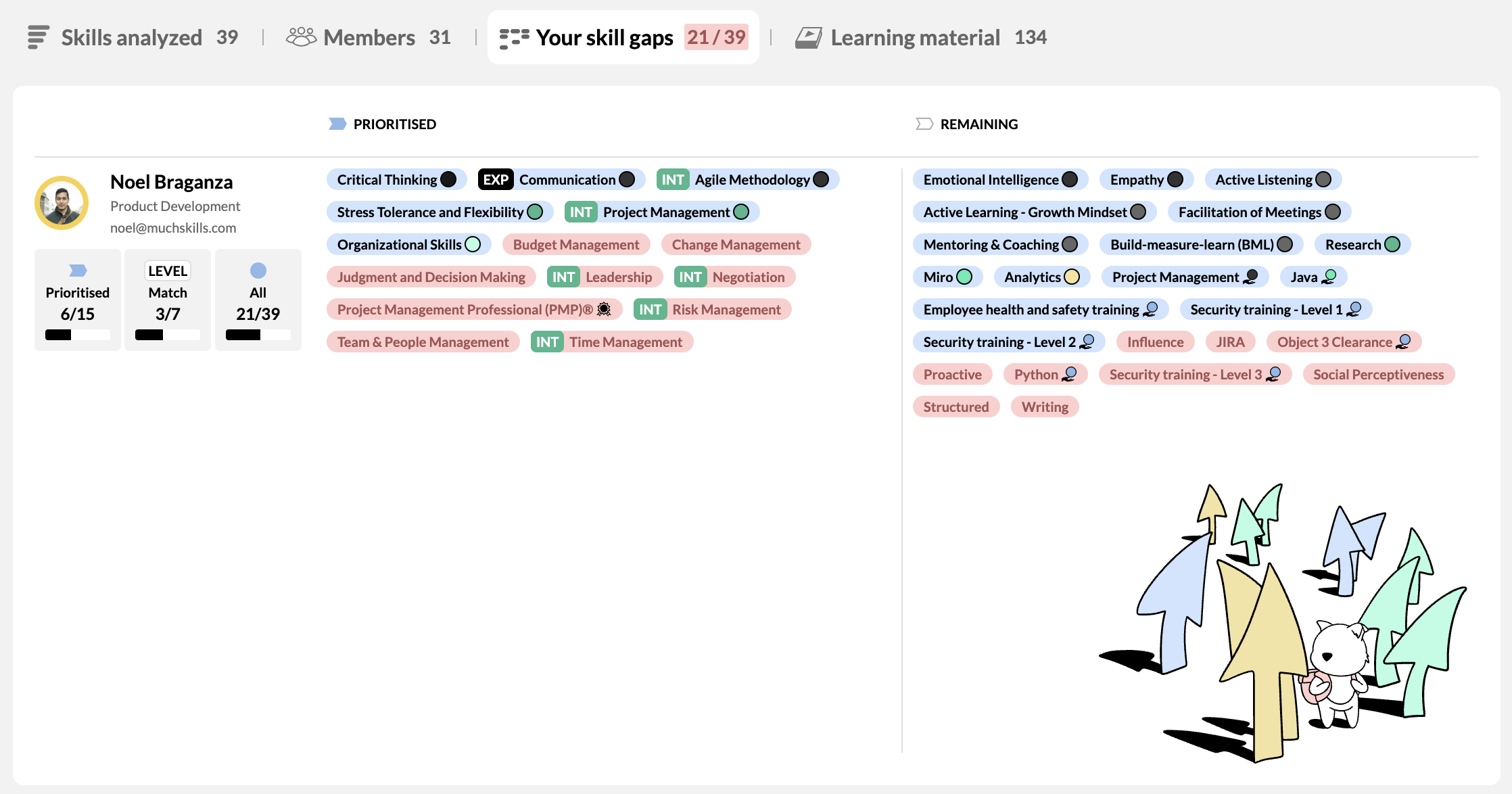
- Similarly, MuchSkills visually displays how well each employee fits within a specific role and its defined skills too. In the fictitious example below, Daniel Nilsson has only 4 of 13 skills needed for the role he is in. You can also view his skill levels and the skills missing for that particular role. This enables the employee to understand their skill status and what skills they need to build so that they become a better fit for that role.
Get started with your skills matrix today
MuchSkills simplifies skills matrix creation, clearly visualising competencies across your organisation..
Build a live skills matrix with MuchSkills
Ready to build your skills matrix?
MuchSkills simplifies skills matrix creation, clearly visualising competencies and skills gaps across your organisation. Request a demo or explore the skills matrix product to see how it works.
For a deeper look at how skills matrices are evolving and what a modern one needs to include, read our complete skills matrix guide.
FAQs



Not answered here? A real person replies, usually the same working day.
What is a skills matrix?
A skills matrix is a structured tool that maps the skills and competencies of individuals across a team, department, or organisation, showing what skills exist, at what proficiency level, and where. It is used to identify skills gaps, plan staffing decisions, support employee development, and give leaders a clear picture of workforce capability.
What is the difference between a skills matrix and a competency matrix?
The terms are used interchangeably in practice, and in most organisations the distinction does not survive contact with the people using them. Where it does hold, a competency matrix is broader – capturing behaviours, knowledge and attributes alongside technical ability – while a skills matrix focuses on discrete skills and their proficiency levels. If the distinction matters for how your organisation defines roles, competency mapping covers the broader approach in full.
What should a modern skills matrix include exactly?
A modern skills matrix should include proficiency levels (not just presence or absence of a skill), soft skills alongside technical skills, certifications with validity dates, employees' interest in using particular skills, a role skills baseline for gap analysis, and a mechanism for continuous updates. A static list of names and skills is no longer enough – see the full breakdown of what to include in our complete guide.
How often should a skills matrix be updated?
A skills matrix should be updated continuously rather than periodically. Skills change through project work, training, and role changes – waiting for an annual review means the data is structurally out of date before the year is over. Best practice is to embed skills updates into existing workflows: project completions, development conversations, onboarding, and role transitions. The more regularly it is maintained, the more useful it becomes as a management tool rather than a compliance record.
What is the difference between a skills matrix and a skills inventory?
A skills inventory is the list of skills your workforce currently has. A skills matrix maps those skills against roles, teams, or required skills – showing the relationship between what exists and what is needed. The inventory is the raw data; the matrix is the structured view that makes it usable for decisions. Your skills gap analysis starts where the matrix leaves off – identifying where the gaps are and how to close them.
What is an employee skills matrix?
An employee skills matrix maps one person's skills and proficiency levels against the requirements of their role. It shows what the role asks for, where that individual currently sits, and the distance between the two. A staff skills matrix is the same instrument under a different name. The term is used more often in UK and public sector contexts, and it describes no difference in structure or purpose.
What is the difference between a team skills matrix and a department skills matrix?
The difference is scope rather than structure. A team skills matrix maps a working group against the skills it needs to deliver, and is generally used for staffing, cover and identifying single points of failure. A department skills matrix widens the same view to a whole function, and is used for planning – seeing where capability is concentrated, and which skills exist in only one team. Both work best when they are the same underlying data viewed at different levels, rather than separate documents maintained separately.


Ready to see what your teams can do?
MuchSkills turns the skills scattered across CVs, spreadsheets and heads into one living map — so staffing, planning and development decisions start from evidence, not guesswork.